

CI/CD release regression
Before every release, the new version needs a regression run to make sure the change didn't break anything that already worked. Below is one real release, told in order: a developer commits code, the pipeline triggers a replay, the result stops the pipeline, the AI finds the cause, the group chat gets a notification, someone handles it, and the fixed version is released. Each stop covers what happens, what you see, and what to watch out for.
18:19
This release ran on a demo environment: a Java pricing service with 3 endpoints; production and test instances on one machine, with production traffic simulated by a script; the chat bots were replaced by a local program that received the messages, so what is shown below is exactly what the group would get.
Setup (once)
- Attach the Softprobe agent (a probe that starts along with the service) to the service in production, tag it
env=prod, and let it record real production requests and their results. See Attach the Java agent. - Attach the agent to the service in the test environment too, with the same application ID and the tag
env=test, but don't record there: set the sample rate forenv=testto 0 in the recording settings. See Recording settings. - Register the endpoints that must be tested on every release as "main endpoints". See Main endpoints.
- Set up AI and bind the application's code repository (recommended), so the AI can tell which commit caused a difference. See Set up AI diagnosis and code repositories.
- Add a Feishu or DingTalk bot to the group chat. See Replay notifications.
- Before letting the result stop releases, replay the version already running in production until it comes back
CLEAN(fields that change on every run go into diff rules so they're skipped), then break something on purpose once and confirm the pipeline really stops. See Diff rules.
Keep the test environment isolated from production
During replay, database, cache and downstream API calls are answered from the recording by default, and a call with no matching recording is marked failed. But an application can set individual dependencies to make real calls, and a few kinds of calls (UMQ message sends, for example) really go out when no recording matches. So the test environment must not be connected to production databases or downstream services. Also, the endpoint that triggers replays has no authentication; only CI machines on the internal network should be able to reach it. See Dependency mock and Before you start.
① A developer commits code, and it's deployed to test
A developer committed 0026097 ("调整会员价计算", adjust the member price calculation), changing member-price rounding from half up to rounding down, without realizing it would lower the payable amount. The pipeline built as usual and deployed the new version to the test environment.
② The pipeline triggers a replay
Once the deployment finished, the pipeline had one extra step: run the script Softprobe provides (the complete script; for each CI system, see Wire it into your pipeline):
export SP_BACKEND=http://<softprobe-address>:8090
export SP_APP_ID=sp-diag-e2e-app                 # application ID
export SP_TARGET=http://<address-of-the-new-version-in-test>
export SP_CASE_TAGS='{"env":"prod"}'             # replay only production recordings
export SP_CASE_SOURCE_HOURS=8                    # replay recordings from the last 8 hours
export SP_REVISION=0026097 SP_BRANCH=release/2026.10 SP_PIPELINE_RUN_ID=130
bash ci/softprobe-replay.sh
The script first printed the following (this run used the Chinese version of the script; the English one prints Replay triggered, planId=...):
已触发回放,planId=6abcdf32e5eb34767296d347Watch out: only production recordings count as the reference. Replay answers "has the new version changed compared with production?", and requests recorded in the test environment would muddy that reference. The commit, branch and pipeline run number show up in the report and the chat message, so it's clear at a glance which release this is.
③ Replay: production requests against the new version
Softprobe sent the 237 requests recorded in production over the last 8 hours, one by one, to the new version in the test environment. The new version ran its business code as usual; when it queried a database or called a downstream service, the recorded results answered, so the test environment needed no prepared data. After 1 min 34 s, all 237 requests had been replayed.
Then the new version's responses were compared with production's: 2 of the 3 endpoints matched completely; /order/price replayed 81 requests, and in 79 of them the payable amount payable was 1 lower than in production.
④ The result stops the pipeline
Once the replay ended and AI noise reduction (which excludes fields that change on every run, such as timestamps) finished, the result was settled. The script printed (Chinese script: "Replay findings", "Report"):
回放结论:NEEDS_ACTION
报告:https://<console-address>/sp/workbench/sp-diag-e2e-app/runs/6abcdf32e5eb34767296d347
The script exited with code 1, and the pipeline stopped instead of releasing. From trigger to here took 2 min 23 s.
Results fall into three groups:
| Result | Meaning | Pipeline |
|---|---|---|
CLEAN | Tested, no problems found | The only case that continues the release automatically |
NEEDS_ACTION, REVIEW_ONLY | Results changed, e.g. an endpoint returned errors, a field value changed, a field was added | Stop; someone reads the report and confirms |
LOW_COVERAGE, NO_CASES, INTERRUPTED, ENVIRONMENT_FAILURE | Nothing was really tested this time: coverage too low, no requests to replay, the replay didn't finish, many endpoints failing the same way | Stop, find out why, and run again |
Watch out: go by the result, not the pass rate. The pass rate this time was 66%, but a 95% pass rate may mean the order endpoint is the one that broke, and 100% may mean only three endpoints were tested. "Nothing was really tested" must stop the pipeline too — that's exactly when this regression saw nothing. For how each result is determined, see Decide whether to continue.
⑤ The AI finds the cause
The pipeline doesn't wait for the AI. About 9 minutes after it stopped, the AI finished: all 79 differences were caused by a code change, in commit 0026097, line 12 of PricingService.java. It also explained why: a list price of 1990 at 15% off is 1691.5, which rounds half up to 1692 and down to 1691. The report shows the code before and after the change (in this run the AI wrote its analysis in Chinese):
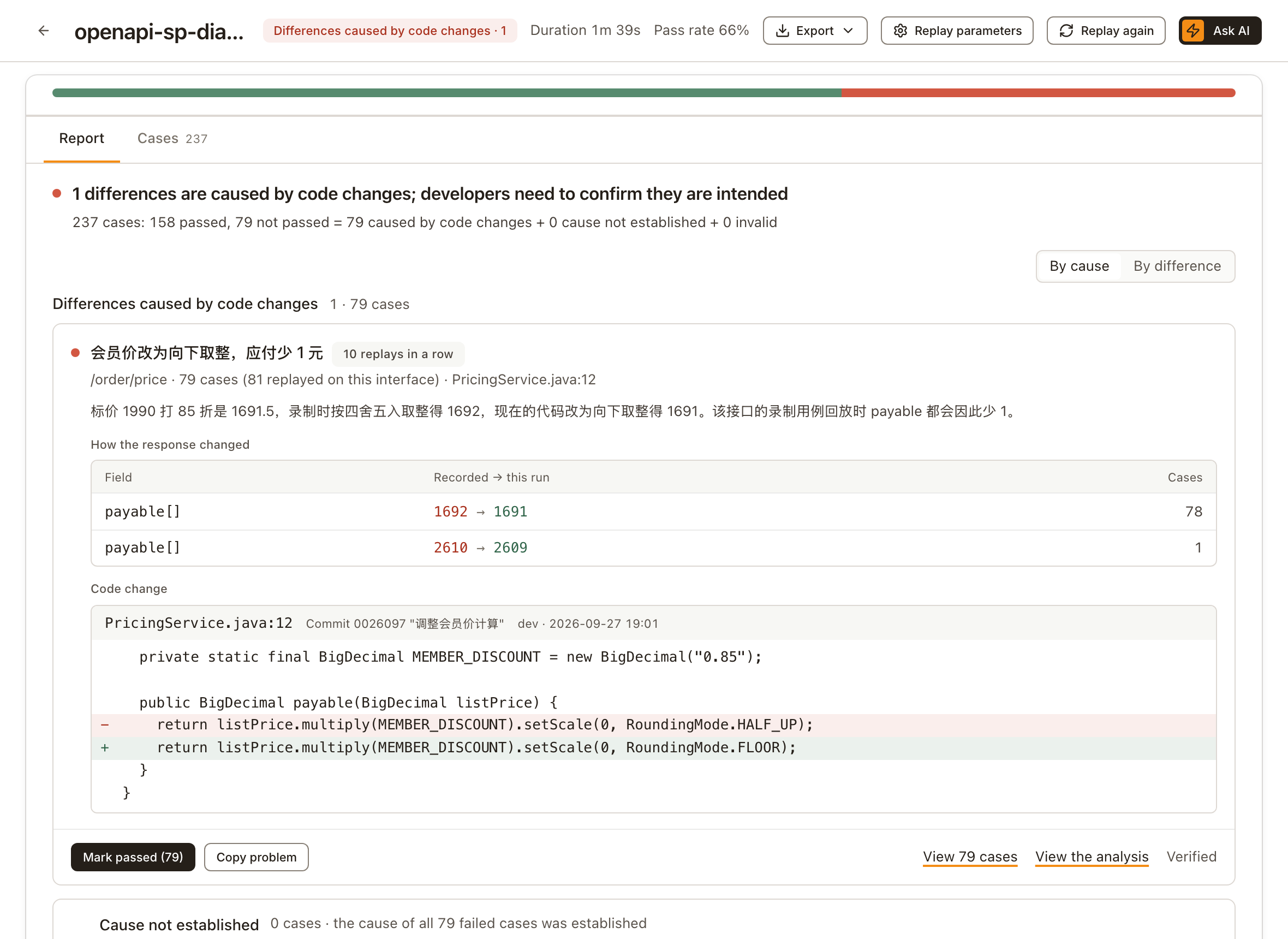
Watch out: the AI sorts failed cases into Differences caused by code changes, Cause not established and Invalid, but it can be wrong, so its analysis doesn't change the result and a person always decides whether to release. The AI reads the code on the bound branch and doesn't check that it's the version being released, so bind the branch you release from.
⑥ The group chat gets a notification
When the AI finished, the Feishu group and the DingTalk group both got a message. Notifications are currently written in Chinese. Below is the DingTalk message as received (link addresses removed, title shown in bold); Feishu gets a card with the same content:
DingTalk message
sp-diag-e2e-app 发版回放:1 处差异由代码改动引起
环境:test
流水线:#130
分支:release/2026.10
提交:0026097
回放接口:3 个
回放请求:237 个
一致接口:2 个
代码改动引起的差异 · 1 处
· 会员价改为向下取整,应付少 1 元(首次出现):接口数 1,受影响请求 79/81,示例接口 /order/price
未通过的 79 条都由代码改动引起。
待处理 · 1 个接口
· 字段值不一致:接口数 1,受影响请求 79/81,示例接口 /order/price(payable)
录制时段:prod 环境,9 月 30 日 10:06 至 18:06;回放时间:9 月 30 日 18:06,耗时 1 分 34 秒。
已按忽略规则排除字段 quoteId、quotedAt。
查看待处理问题 查看回放结果
The title is the result. Below it come this release's details, how much was replayed, the differences caused by code changes, the problems to handle, and finally the links to the report. "首次出现" (first seen) means this difference was reported for the first time.
Watch out: the chat message only lets people know early; it can arrive late or fail to send. Whether the pipeline stops is decided by the result. To hear only about problems, turn on Only on failure for the channel.
⑦ Someone confirms and handles it
The developer opened the report and confirmed the change wasn't intended: the member price shouldn't go down. So they restored half-up rounding.
Had the change been intended, the next step would have been Mark passed in the report, then approving the release manually in the pipeline. Mark passed applies to that one replay only.
Watch out: replay compares "same as production or not", not "right or wrong". If production has a bug and the new version fixes it, replay reports a difference too, so only a person can judge whether something should have changed. And don't add business fields such as amounts or statuses to the ignore rules just to get the pipeline through — after that, the regression can never catch that field changing. For going through differences, see Review differences.
⑧ Fixed, released again, passed
At 18:19 the fixed version was deployed again, and the pipeline replayed the 237 production requests once more. This time all 3 endpoints matched, and the script printed:
回放结论:CLEANExit code 0, and the release continued. The group chat got the passing message too:
DingTalk message
sp-diag-e2e-app 发版回放:回放的 3 个接口均与录制结果一致
环境:test
流水线:#131
分支:release/2026.10
回放接口:3 个
回放请求:237 个
一致接口:3 个
录制时段:prod 环境,9 月 30 日 10:19 至 18:19;回放时间:9 月 30 日 18:19,耗时 1 分 35 秒。
已按忽略规则排除字段 quoteId、quotedAt。
查看回放结果
The replay itself took 1 min 35 s, but the whole step took about 8 minutes: when no request fails, AI noise reduction waits a few extra minutes to make sure the replay statistics are fully written before it finishes. Leave room for that in the pipeline's timeout.
The fixed code matches production, and the result was CLEAN — which also shows this regression doesn't raise false alarms when the code hasn't changed.
Day-to-day upkeep
- Look back regularly: check differences marked "N replays in a row" in reports, and the fields the diff rules ignore. After an intended change ships, while requests recorded from the old version are still within the replay range (by default, recordings from the last 24 hours are replayed), later releases keep reporting the same difference; and ignore rules only grow, so over time business fields tend to slip in.
- Cover rare requests: key requests that only happen at month end or at night may not be in the recent recordings. Save them as "pinned cases" (which don't expire with the recordings), and on each release replay them and the recent recordings separately and check each result separately. See Pinned cases.
Self-check
| Check | Passes when | Where |
|---|---|---|
| Production recordings are tagged | Production requests carry a tag such as env=prod | Attach the Java agent |
| Test environment doesn't record | The test environment's sample rate is 0 | Recording settings |
| Replay uses only production requests | Replays are triggered with a tag filter | Trigger the replay |
| Test environment isolated from production | Not connected to production databases or downstream services; the trigger endpoint is open only to internal CI | Before you start |
| Must-test list | Must-test endpoints are all registered; rare but key requests are pinned | Main endpoints, Pinned cases |
| Regression proven reliable | The same version replays to CLEAN; a deliberately broken change stops the pipeline | Diff rules |
| Pipeline goes by the result only | Only CLEAN continues automatically; it also stops when nothing was really tested | The complete script |
| Someone owns the confirmation | Who reads reports and who can approve releases manually is agreed in advance | Review differences |
| AI (recommended) | A model is connected and the bound branch is the release branch | Set up AI diagnosis and code repositories |
| Notifications | A test message from the chat bot arrives | Replay notifications |