

Set up AI diagnosis and code repositories
With a model connected, SoftProbe can pick out noise automatically after each replay (AI noise reduction), work out whether failed cases were caused by a code change (AI root-cause analysis), and help you investigate through chat in the console. Bind an application to its code repository as well, and the analysis can point at the actual change in the code.
Recording and replay work fully without a model. Diff rules still filter out noise; you only lose automatic noise reduction and root-cause analysis.
Setup takes four steps, all in the console:
- Connect a model service
- Choose the models for noise reduction and analysis
- Add a Git account
- Bind applications to their repositories
Network and data
Noise reduction, root-cause analysis and chat all run on the platform server, which needs to reach:
| Source | Destination | Port |
|---|---|---|
| Platform server | Your model service | The model service's port |
| Platform server | Your code repositories | HTTPS 443 (22 for SSH URLs) |
The AI sends replay differences, related recorded payloads and code excerpts to the model service you configure. With a model hosted on your own network, that content stays on your network.
1. Connect a model service
Open Settings → Providers at the top right. On a self-hosted platform you'll usually connect your own model service: find Custom provider at the end of the list, click Connect, and fill in:
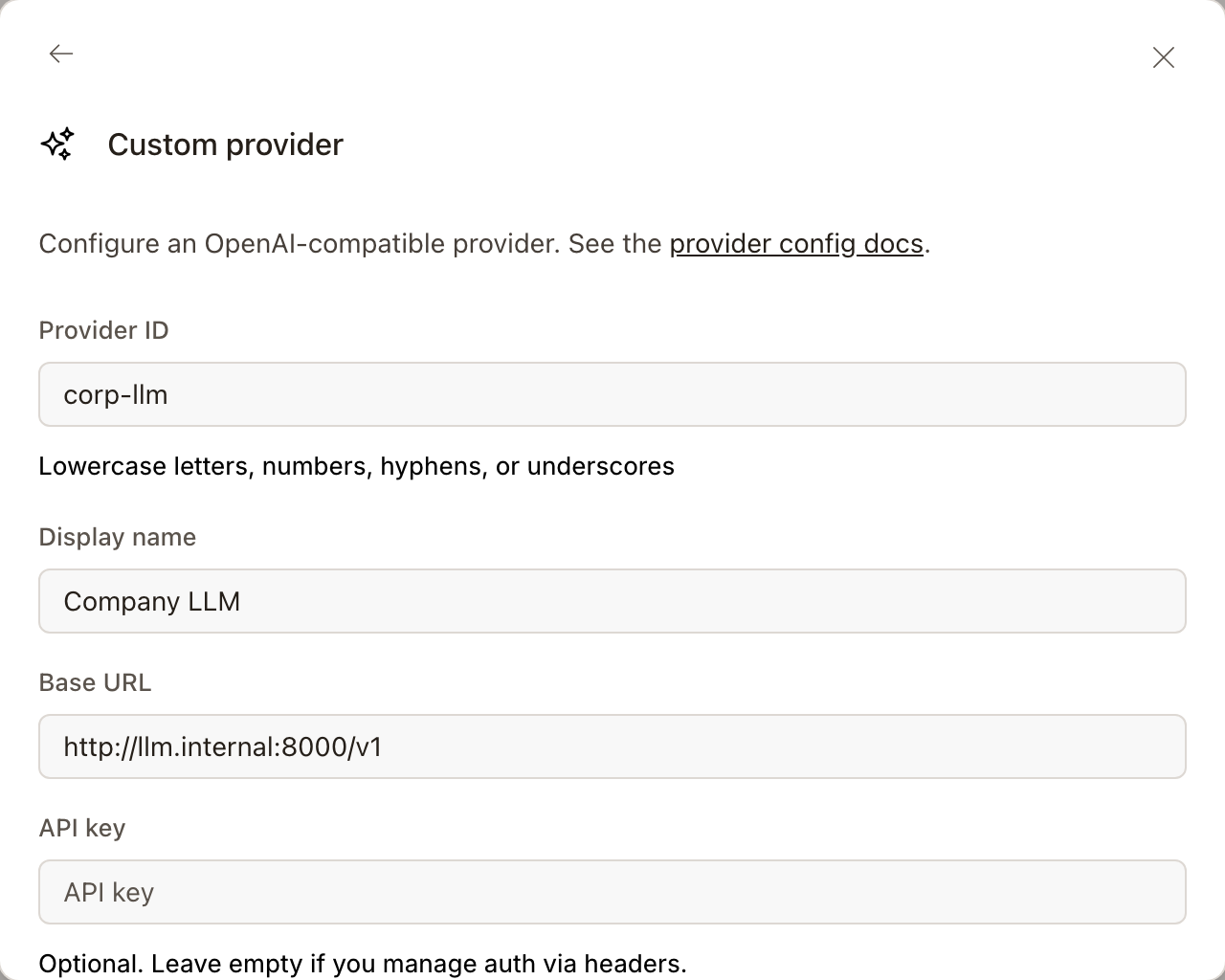
| Field | Notes |
|---|---|
| Provider ID | An identifier of your choice: lowercase letters, numbers, hyphens or underscores |
| Display name | The name shown in model lists |
| Base URL | The model service's address; it must be OpenAI-compatible, for example http://llm.internal:8000/v1 |
| API key | The model service's key. Leave it empty if you authenticate with headers, and fill in Headers below instead |
| Models | The ID and display name of each model to use; add as many as you need |
Click Submit to save. The other providers in the list, such as Anthropic and OpenAI, can be connected directly as long as the platform server can reach them.
2. Choose the models for noise reduction and analysis
Settings → Models lists every connected model; the switches decide which ones appear in model pickers.
Noise reduction and root-cause analysis run on the server. Choose their models in the report's flow settings; the model picked in chat doesn't affect them. See Replay report — Flow settings. Root-cause analysis can only use models connected with your own credentials.
3. Add a Git account
To read code during analysis, the platform needs an account with access to your repositories. Open Settings → Git accounts, click Add personal token, and enter your Git platform's address (for example https://git.example.com) and a personal access token that can read code. The token is checked against the Git platform before it's saved, then stored encrypted on the platform server.
You can remove the account here at any time.
Administrators: OAuth
On a self-hosted platform, an administrator can set up OAuth apps for your internal GitLab or GitHub, so users authorize with their own Git accounts instead of each creating a token. The entry is Admin · Configure OAuth providers at the bottom of the Git accounts page. If the page says the server needs configuring first, contact SoftProbe.
4. Bind applications to their repositories
Open Applications at the bottom left and click the bind button (the branch icon) on the application's row to open Bind Git repository:
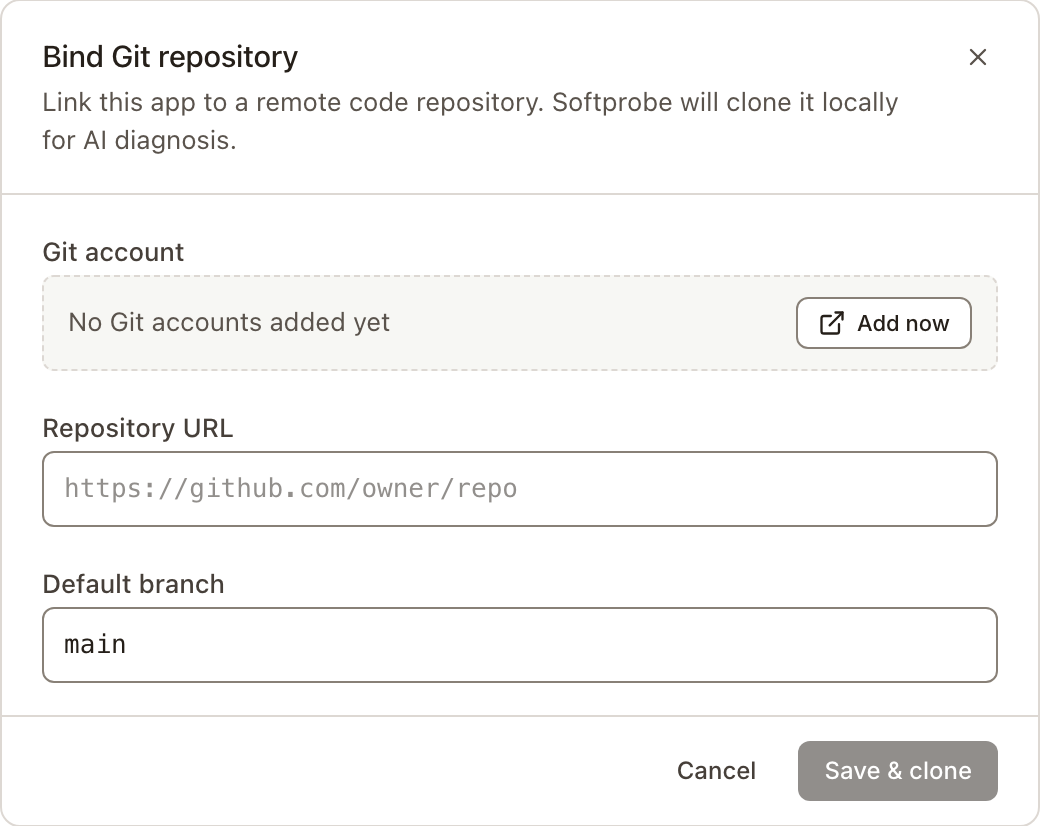
| Field | Notes |
|---|---|
| Git account | The account added in the previous step |
| Repository URL | For example https://git.example.com/team/order-service |
| Default branch | The branch the AI reads, for example main |
Click Save & clone, and the platform clones the code onto the platform server. Once the status is Ready, it's in use. On Clone failed, check the token's permissions and the network from the platform server to the repository.
The AI reads the bound branch. SoftProbe doesn't check that this code matches the version actually running in the service under test; the report records which branch and commit the analysis read.
When the platform can't reach your repositories
If your repositories are on a network the platform can't reach (for example with SoftProbe Cloud), use the desktop client: under Applications, click Bind folder on the application and point it at code already cloned on your computer. The AI reads the code on that computer, and the code never leaves it.
Running without AI
Without a model service, set SP_DISABLE_AI=1 in softprobe/.env on a single-server install and run ./start.sh: the AI service no longer starts, which saves memory. AI entries still appear in the console but don't work. See Single-server install — Configure.