

Replay notifications
When a pipeline-triggered replay finishes, SoftProbe can post the result to a Feishu group, a DingTalk group, or your own system.
Only API-triggered replays are posted
Only replays started through the endpoint in Replay after deployment (POST /openapi/v1/replay-triggers) send notifications. Replays started from the web console, scheduled replays, and replays started with GET /api/createPlan or the sp command don't.
Add a channel
- Open the Notifications tab in settings and click Add channel under Notification channels.
- Fill in the fields below and save.
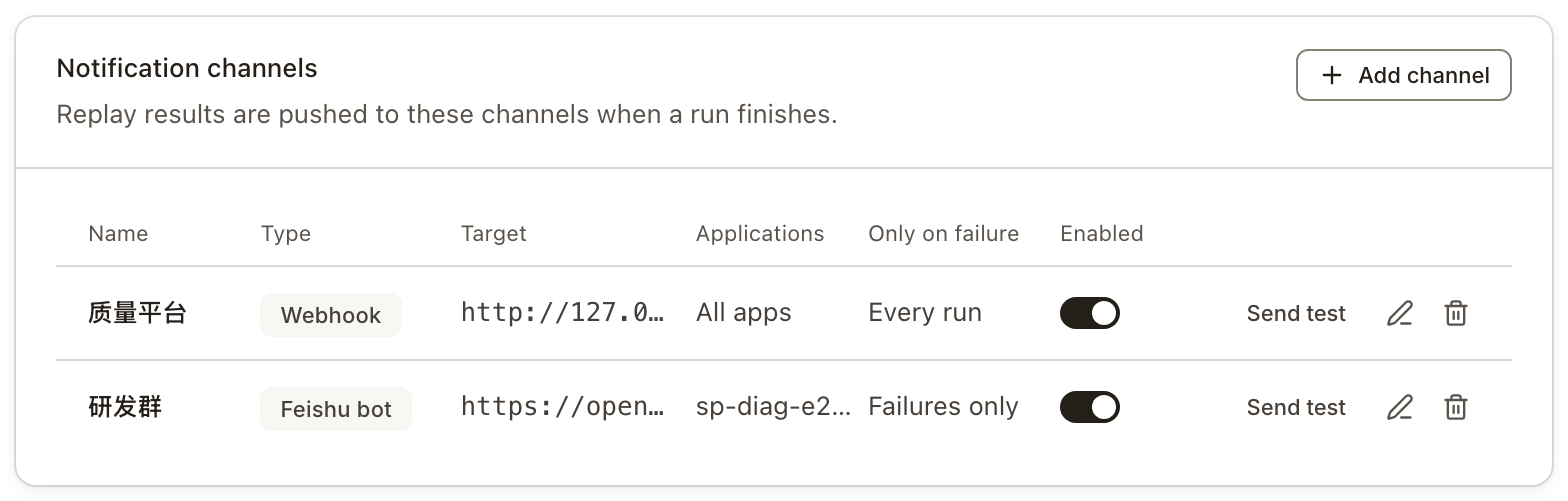
- Click Send test on the channel's row. A sample card is posted to the channel; check that it arrived.
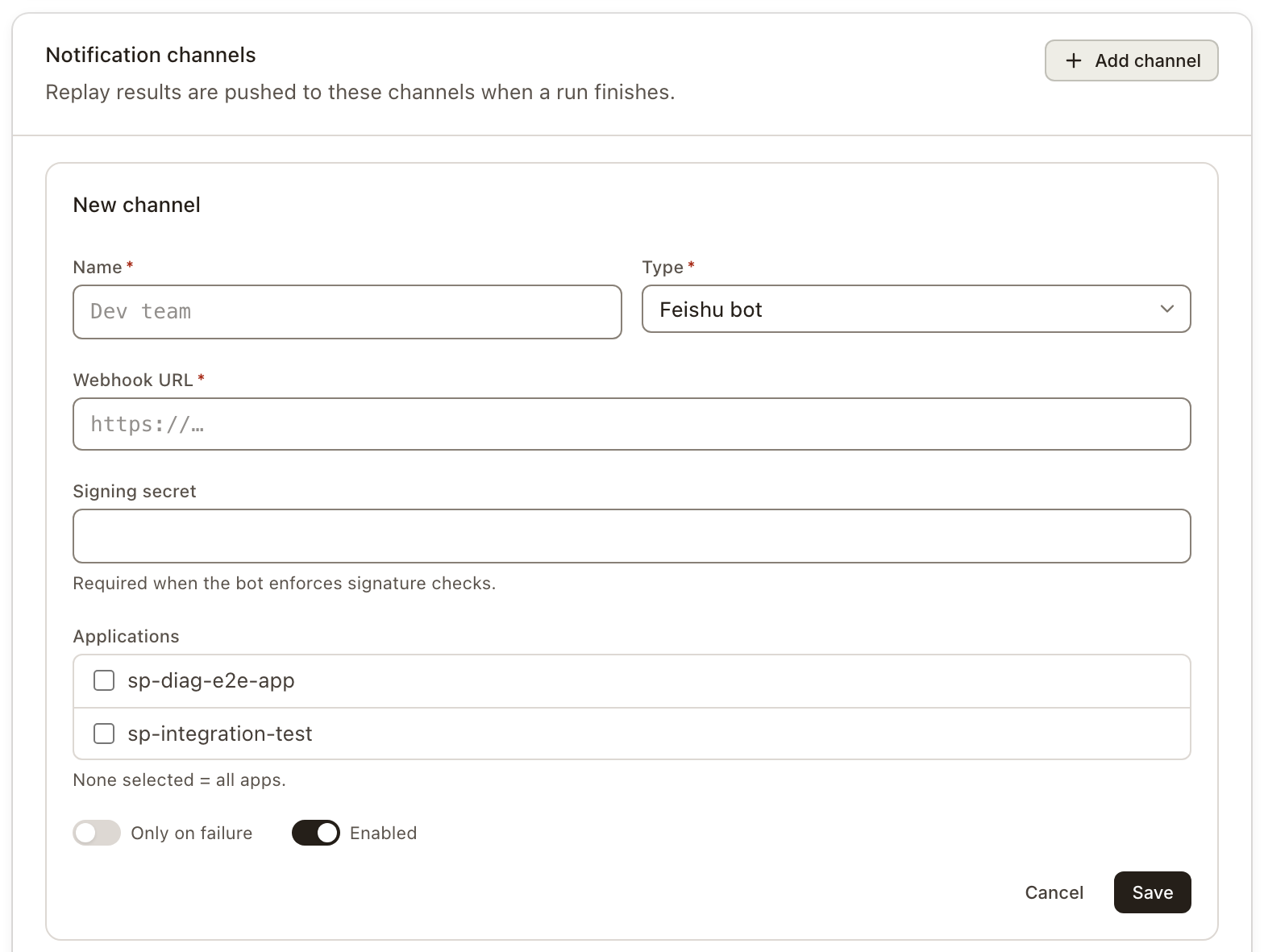
| Field | Description |
|---|---|
| Name | Something you'll recognize, such as "Dev team" |
| Type | Feishu bot, DingTalk bot, or Webhook |
| Webhook URL | The chat bot's webhook URL, or your own system's endpoint; http and https only |
| Signing secret | Required when the chat bot has signature verification on; for the Webhook type, see below |
| Applications | Which applications' replays are posted here; leave empty for all applications |
| Only on failure | When on, a card is posted only when the result isn't "verified, no problems found" |
| Enabled | Turn off to pause sending without losing the configuration |
Configured channels are listed below, with which applications each one covers and when it sends:
Things to watch for:
- For a Feishu group, choose Feishu bot, not Webhook. The Webhook type sends raw JSON, which Feishu can't read.
- Channels are saved per backend. With several environments, the page says which one you're configuring; set up each environment separately.
- URLs and secrets are never shown in full. A chat bot's URL contains its credentials, so the page only shows a masked version. When editing, leave the URL and secret empty to keep them unchanged; after changing the type, enter the URL again.
- Test sends are rate-limited. Clicking repeatedly shows Wait a moment.
When notifications are sent
- After the replay finishes, SoftProbe waits for AI noise reduction to finish and the result to be settled, then sends.
- When the result is
NEEDS_ACTIONorREVIEW_ONLYand this replay will also be analyzed automatically (triggered from CI, enabled in flow settings), it waits for the analysis to produce a result, for up to 20 minutes. If the analysis isn't done by then, the notification is sent anyway and says how far the analysis got. Other results don't wait for the analysis. - Feishu and DingTalk receive one message per replay. Recomparing, undoing an ignore or similar actions in the report don't send another; re-running the same replay plan counts as a new round and sends again.
- Only on failure looks at the result, not the pass rate: a replay with a 100% pass rate but too few endpoints (low coverage) still sends a notification.
- A DingTalk bot accepts at most 20 messages a minute; anything beyond that is dropped.
- A failed send doesn't affect the replay or its result. It's only recorded in the server log; there's no delivery history in the UI. If notifications don't arrive, start by checking the channel with Send test.
What's in a notification
Feishu and DingTalk get the same content in different forms: Feishu gets a card with tables and buttons; DingTalk gets a Markdown message where tables become lines and buttons become links. Notifications are currently written in Chinese. From top to bottom:
- Title: the result itself. Once the AI analysis has finished, it names the cause, for example 「order-service 发版回放:1 处差异由代码改动引起」 ("1 difference caused by code changes"); without an analysis, it counts endpoints that need action or review, for example 「order-service 发版回放:2 个接口待处理,1 个接口待核对」 ("2 endpoints need action, 1 to review").
- Deployment details: environment, pipeline (clickable), branch and commit, taken from the
attributespassed when the replay was triggered. Anything not passed is left out. - Replay numbers: how many endpoints and requests were replayed, how many endpoints behaved the same, and how many weren't replayed.
- AI analysis: when the result needs action or review, the analysis result — differences caused by code changes, each marked as first seen or seen N replays in a row — or its progress if it isn't finished.
- Problems that need action or review: one row per kind of problem, with the number of endpoints, the number of requests affected, and one example endpoint.
- Footnotes: the recording window, the replay time (Beijing time), and which fields the ignore rules excluded.
- Links to the report: 「查看待处理问题」 (problems that need action) when there are any, 「查看待核对内容」 (items to review) when there's only something to review, and 「查看回放结果」 (the replay result). All of them open this replay's report.
The Feishu card's color follows the result: red when something needs action, orange when there's only something to review, green when nothing was found; gray when the replay didn't run, didn't finish, hit an environment failure or had low coverage. When the AI analysis has finished and found no differences caused by code changes, red becomes orange — but findings.state doesn't change.
Notifications never include field values or raw error messages — only field names and status codes — so business data doesn't end up in a group chat. The exception is the AI-written problem description, which appears as written.
Receive events in your own system
With the Webhook type, SoftProbe sends a POST request to your URL, with a JSON body in CloudEvents 1.0 format.
- There are two event types:
ai.softprobe.replay.run.completedwhen the result is in, andai.softprobe.replay.run.diagnosedwhen the AI analysis has been written back. The second is only sent to webhooks, not to chat bots. - If you set Signing secret, it is sent as-is in the
X-Webhook-Secretheader for your receiver to compare. Nothing is signed.
The request from one Send test, with some fields removed:
POST /softprobe HTTP/1.1
Content-Type: application/json; charset=utf-8
X-Webhook-Secret: demo-shared-secret{
"specversion": "1.0",
"id": "c207be62-c923-496b-8bd9-37c84ed4c8fa",
"source": "/softprobe/replay",
"type": "ai.softprobe.replay.run.completed",
"subject": "test-plan",
"time": "2026-09-29T09:36:36.640195Z",
"datacontenttype": "application/json",
"data": {
"appId": "sample-app",
"planId": "test-plan",
"verdict": "FAIL",
"passRate": 0.9,
"totalCases": 180,
"successCases": 162,
"failedCases": 18,
"attributes": {
"deployment.environment.name": "staging",
"vcs.ref.head.name": "feature/sample",
"cicd.pipeline.run.id": "1024"
},
"findings": {
"state": "NEEDS_ACTION",
"needsActionInterfaces": 3
}
}
}Fields in data such as verdict, findings and analysis mean the same as in the polling endpoint; fields that aren't available are left out. The full list is under Notification events. Whether a pipeline continues should depend on findings.state from the polling endpoint. Notifications can be lost to network failures or rate limits.
Next steps
- Replay after deployment: trigger replays from the pipeline.
- Replay trigger Open API: manage notification channels through the API.